Take control of your feeds.
A calmer, healthier relationship with your social apps, for you and your family.
The real Kur8 app
What Kur8 does
Everything you need to scroll less.
Kur8 is an iPhone app that helps you spend less time on social media. Open Instagram, Facebook, TikTok, YouTube, X and Snapchat inside Kur8, signed in to your own accounts, with your filters and limits.
You're not the only one
Most of us want less scrolling, not more.
Adults, parents and teenagers keep saying the same thing in independent research.
- Adults
46%
of British social media users want to cut down on their usage.
YouGov, 2026 - Adults
67%
of people who spend at least three hours a day on social media want to cut down or stop.
YouGov, 2026 - Adults
21%
of British adults want to spend a lot less time on social media.
YouGov, 2026 - Parents
55%
of UK parents of 8 to 17-year-olds think their child spends too much time on screens.
Ofcom, 2026 - Parents
49%
of parents of 16 to 17-year-olds find it difficult to control their child's screen time.
Ofcom, 2026 - Parents
93%
of parents are concerned about the potential harms of social media to children.
Parentkind, 2024 - Parents
69%
of parents say limiting children's access to smartphones would make life easier.
Parentkind, 2024 - Parents
75%
of British parents are concerned about what their children see, hear or do online.
Ipsos, 2025 - Parents
55%
of British parents use parental controls or apps on their children's devices.
Ipsos, 2025 - Parents
76%
of US parents say managing their teenager's phone time is an important or top priority.
Pew Research Center, 2024 - Parents
About 40%
of US parents find it difficult to manage their teenager's phone time.
Pew Research Center, 2024 - Teenagers
39%
of US teenagers say they have cut back on social media.
Pew Research Center, 2024 - Teenagers
57%
of US teenagers who feel they spend too much time on social media say they've cut back.
Pew Research Center, 2024
Use the arrows or swipe for more. Each figure links to its source.
Getting started
Set up in five steps.
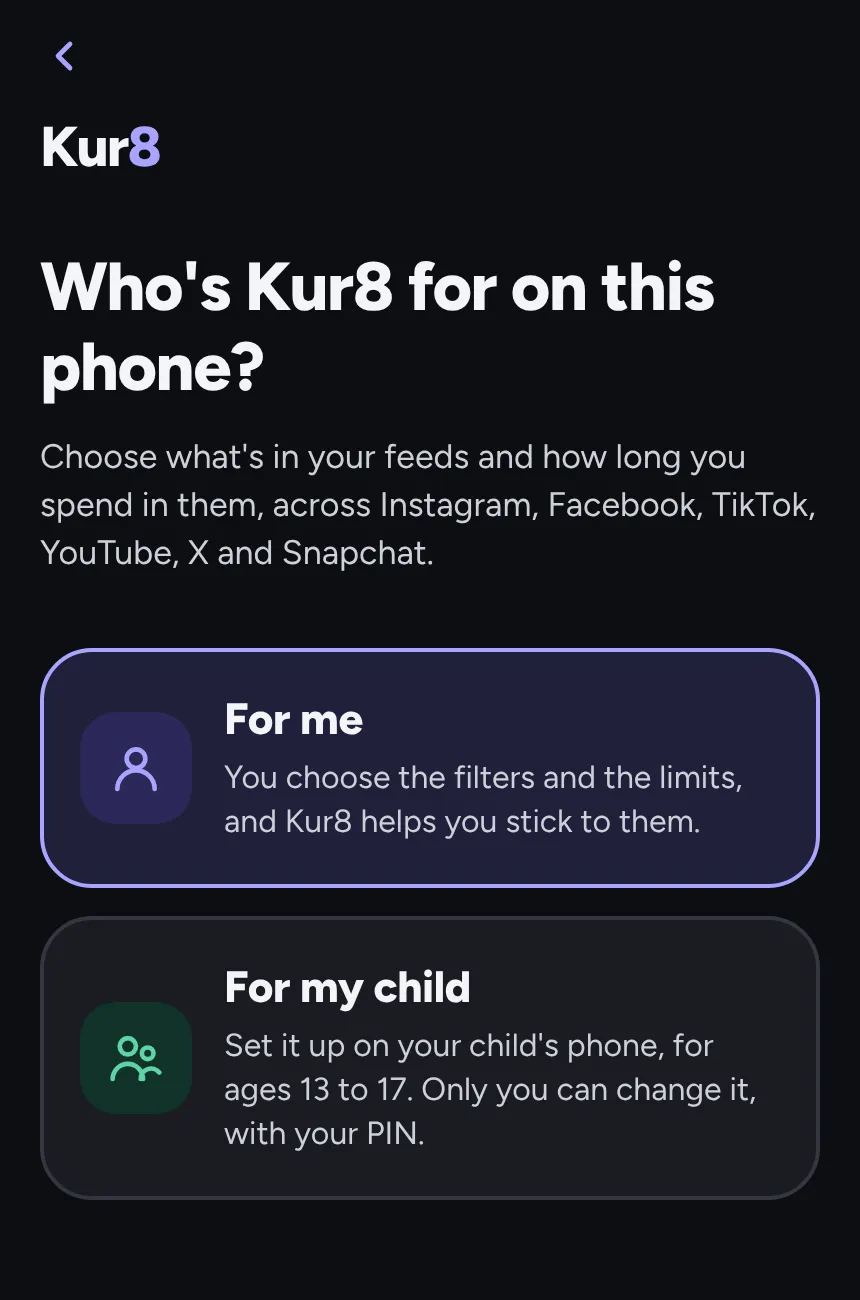
Step 1
Choose who it's for
Kur8 for yourself, or set it up on your child's phone with your PIN.
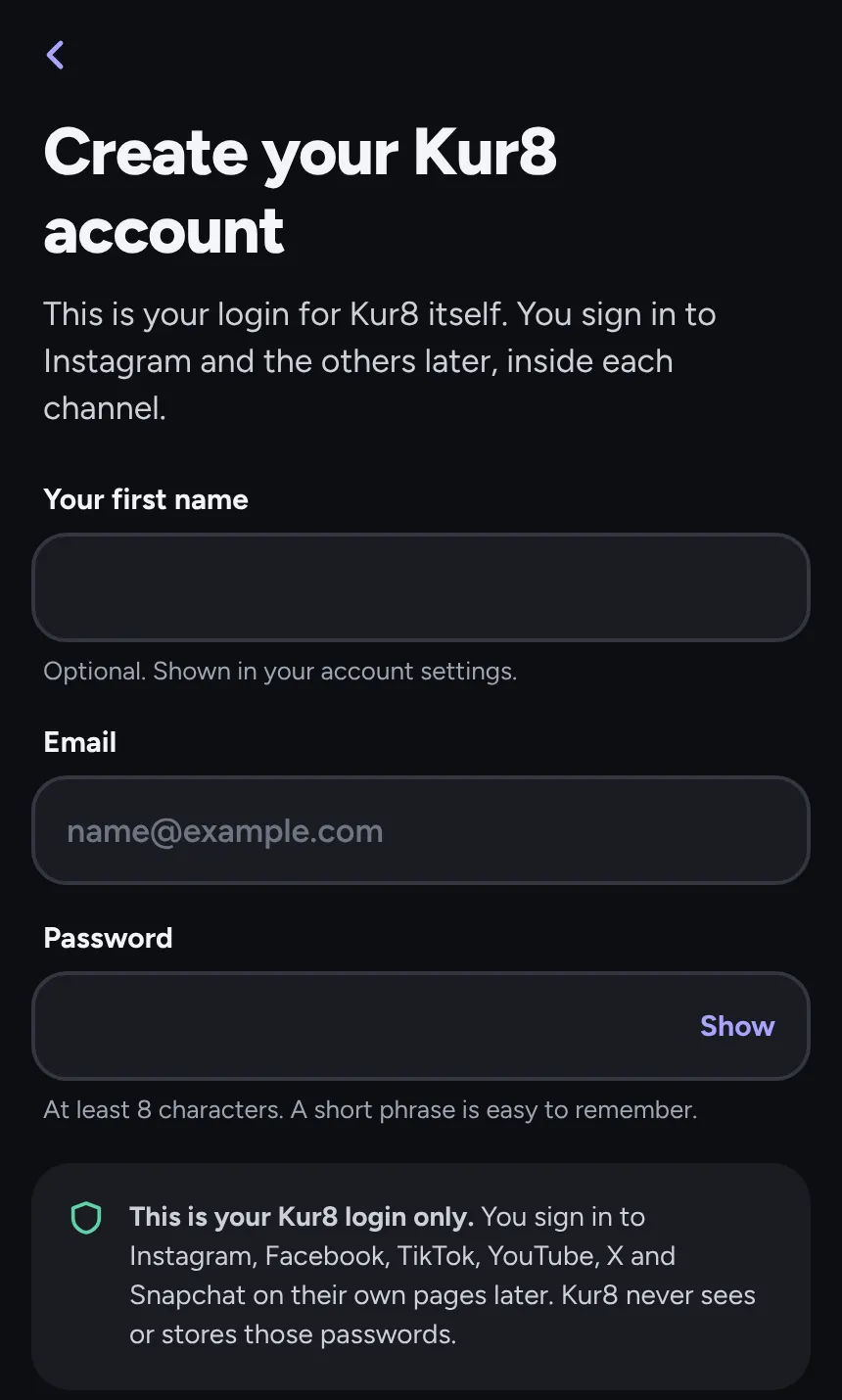
Step 2
Create your Kur8 account
An email and a password for Kur8 itself. Your Instagram and other logins stay on their own pages.
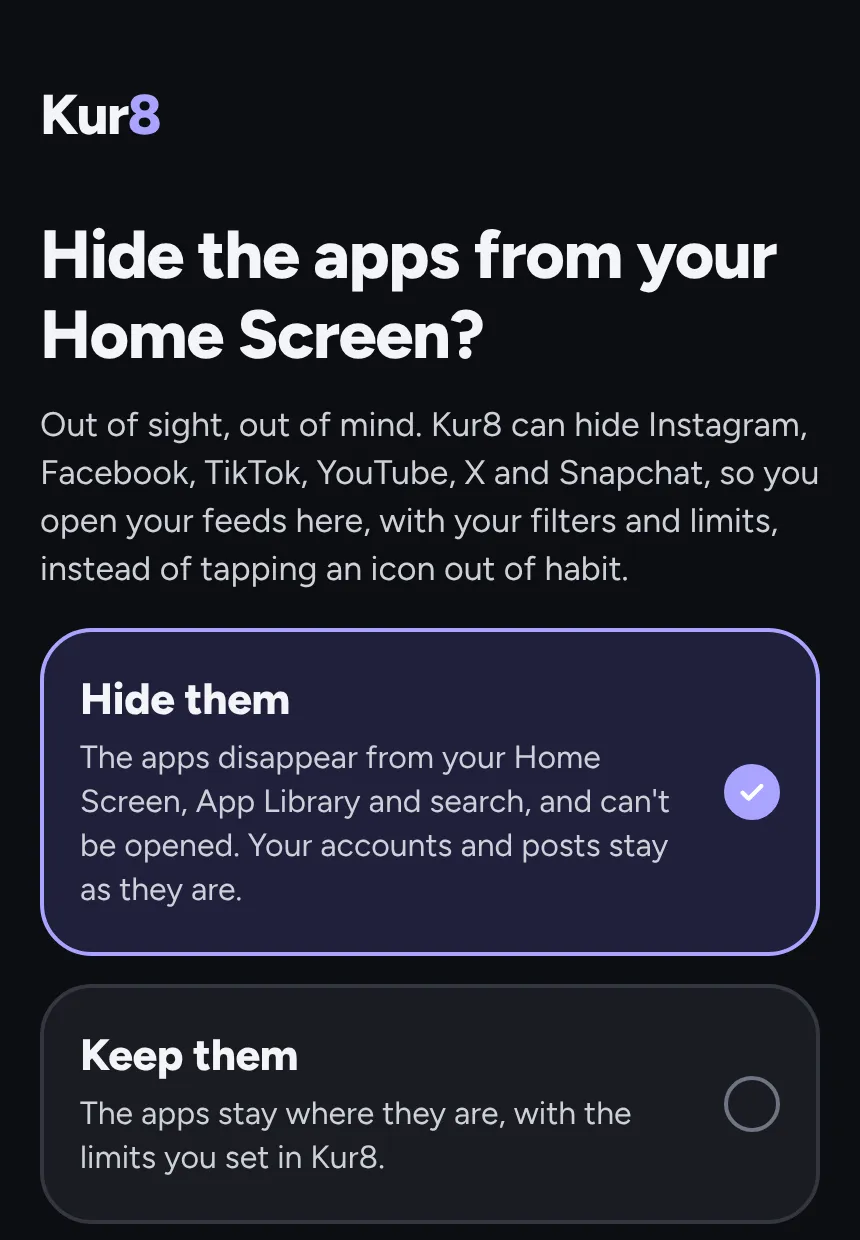
Step 3
Hide the apps, if you like
Take Instagram, TikTok and the rest off your Home Screen, so you only open them in Kur8.
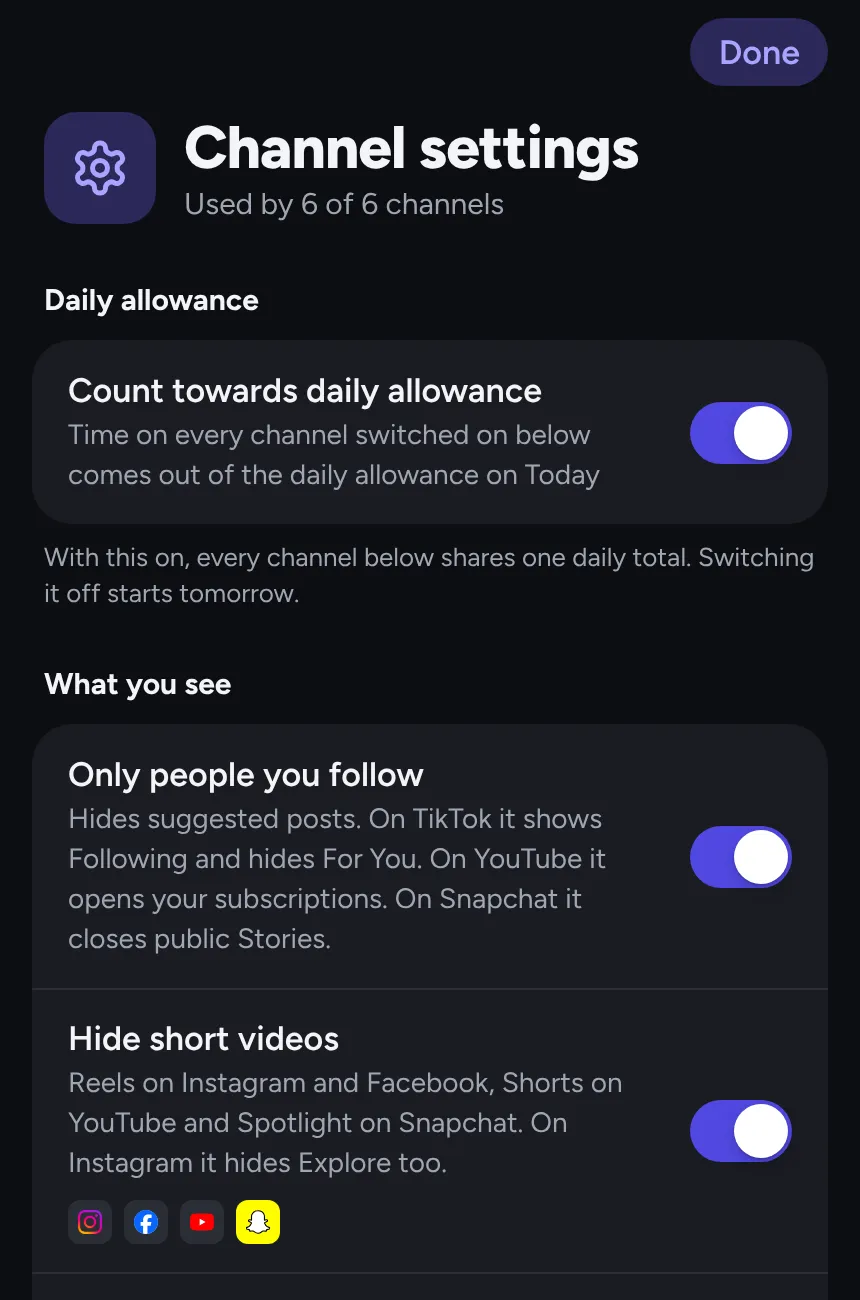
Step 4
Pick your filters and limits
Choose what you see and how long you get each day, across every app.
Step 5
Open a channel and sign in
Tap Instagram or any other channel and sign in on its own page, as you always do. Kur8 never sees or stores your password.
For families
Help your teenager scroll less.
Worried about how much of their evening disappears into a screen? You're not the only one. Put Kur8 on your child's phone (ages 13 to 17) and agree their limits and filters together, without the nightly battle over the phone.
Your child always knows Kur8 is there: their Today screen says so.
The real Kur8 app on a child's phone
Made for a teenager's phone
Use the arrows or swipe to see what their phone gets.
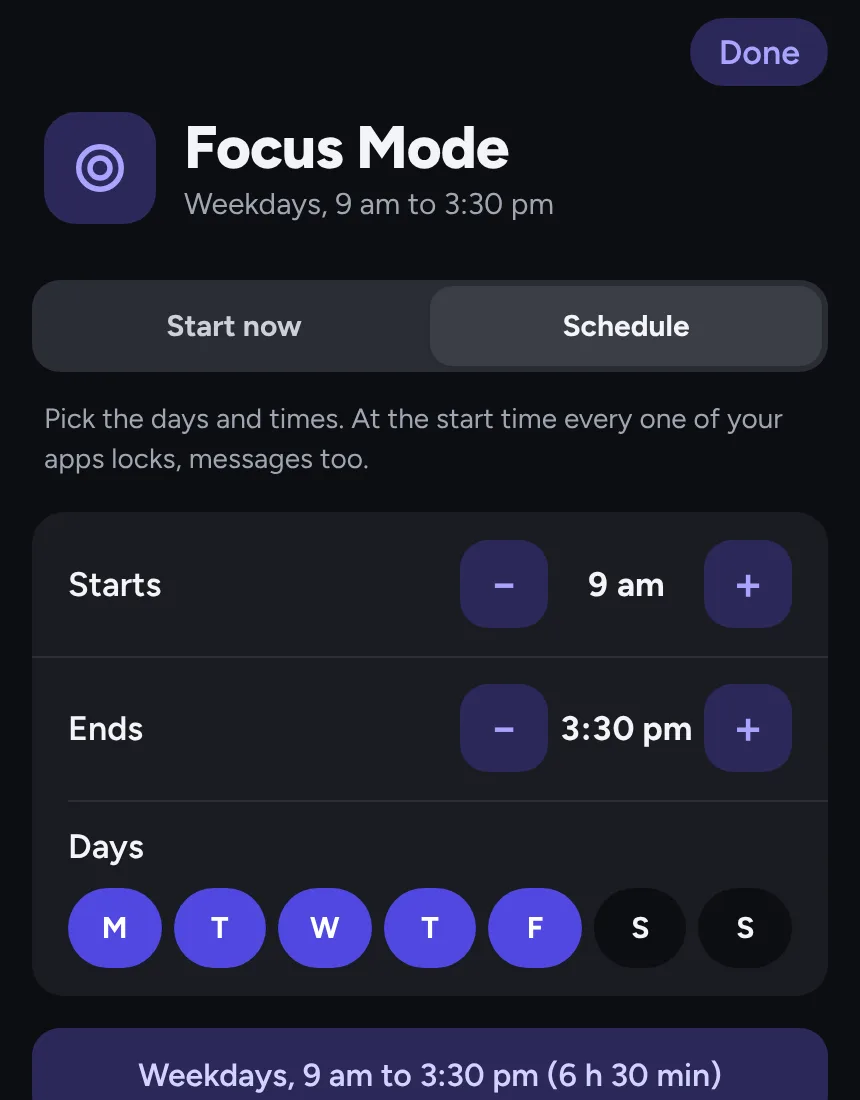
School
School Focus Mode
Every app locks from 9 am to 3:30 pm, Monday to Friday, so lessons get their full attention. Change the days and times to fit their timetable.
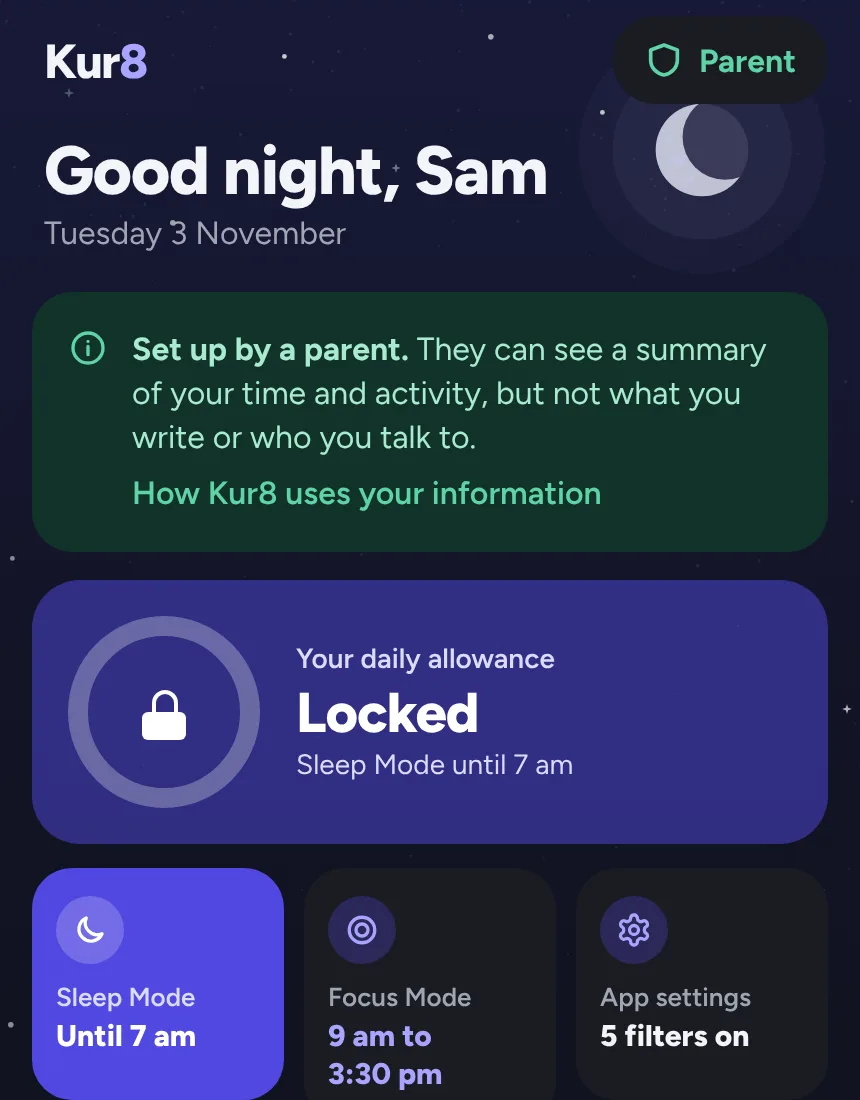
Bedtime
Sleep Mode at bedtime
From bedtime to wake-up every app locks, messages too, however much time is left. It starts at 9:30 pm for a 14-year-old.
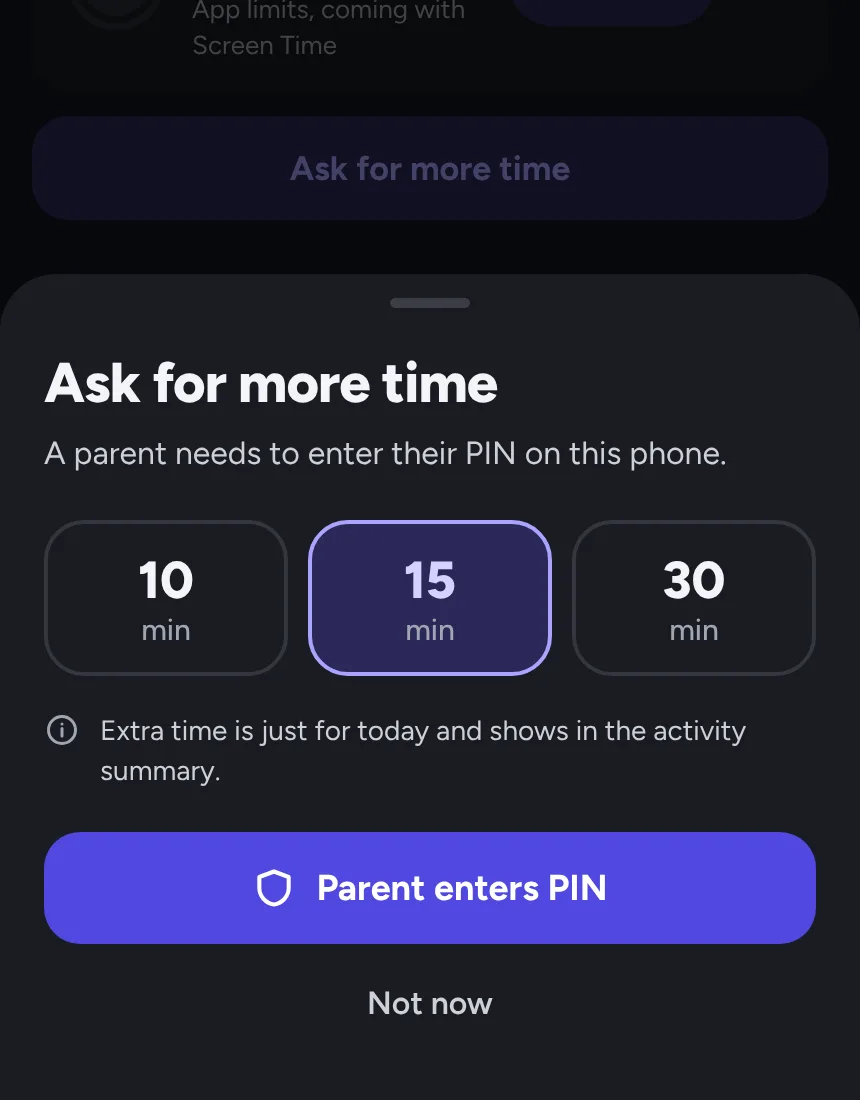
More time
Ask for more time
When time runs out they can ask for 10, 15 or 30 more minutes. You approve with your PIN on their phone, and it's just for today.
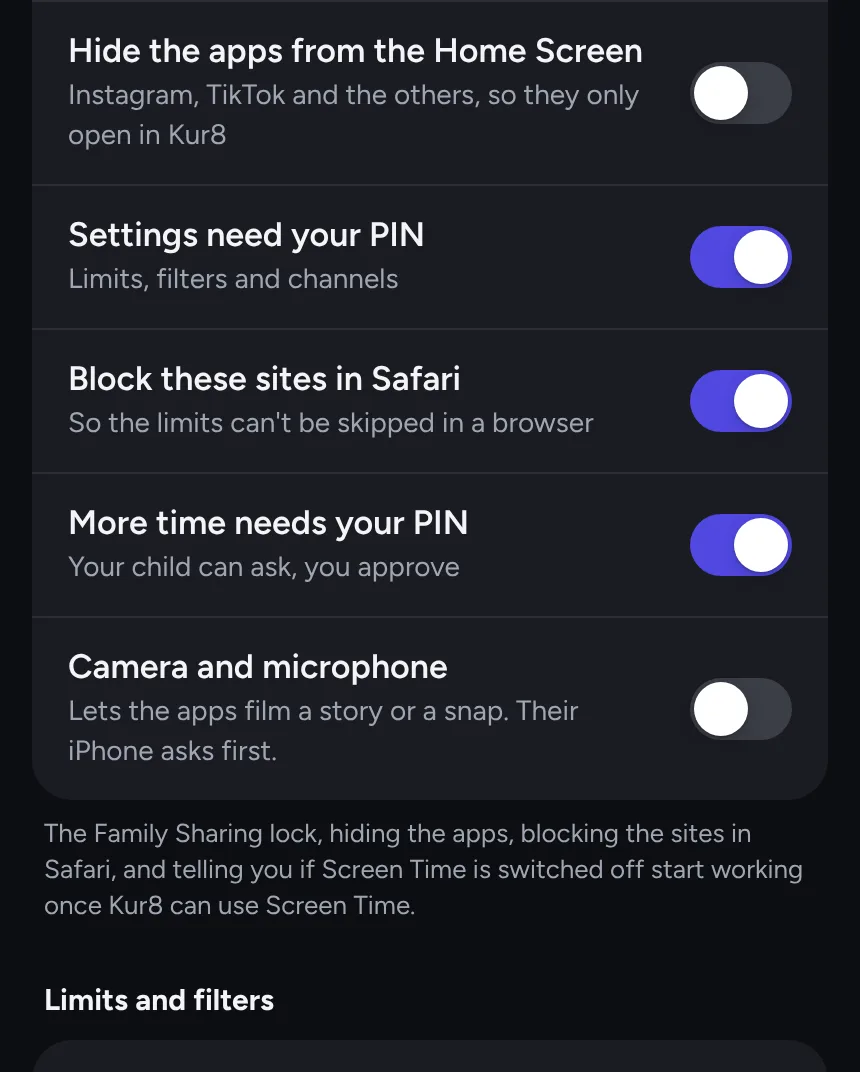
Your PIN
Changes need your PIN
Limits, filters and channel settings only change with your PIN. You also choose whether extra time needs you, and whether the apps can use the camera.
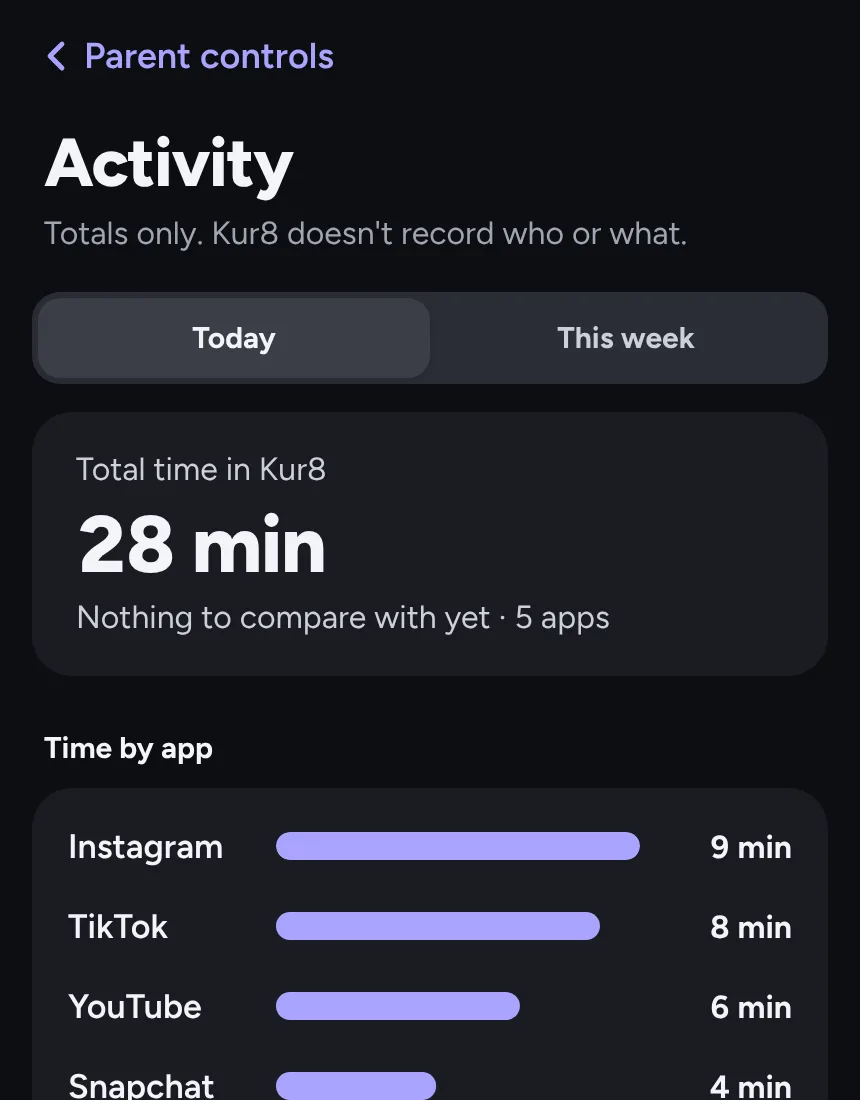
Activity
Totals, never what they saw
The activity summary shows time spent in each app. Never their messages, their posts or who they follow.
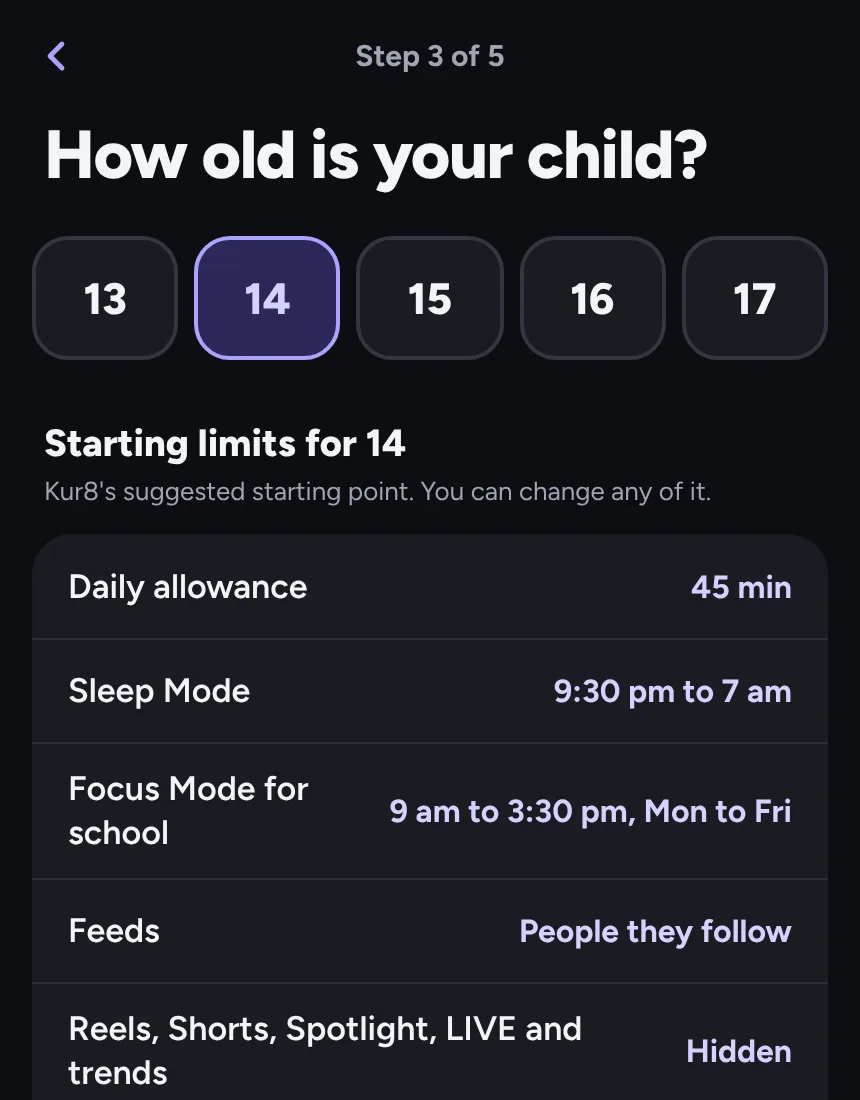
Set up
Starting limits for their age
Choose their age, 13 to 17, and Kur8 suggests a daily allowance, a bedtime, school hours and filters. Change any of them later.

Sound familiar?
You picked up your phone to check the time. That was an hour ago.
You opened the app to unwind. So why do you feel worse?
Another evening gone to the scroll. And you can't remember a single post.
It's not you. Feeds are built to keep you scrolling.
Every reel, every suggested post, every “you might like” is there to keep you a little longer. Willpower was never a fair fight. Kur8 gives you back the controls the apps leave out, so you decide when enough is enough.
What you see
See the people you follow, not what the app pushes.
You followed friends, family and the creators you love. Somehow your feed filled up with strangers, reels and things to buy.
Switch off suggested posts, reels, paid partnerships, creator ads and posts the platform labels as AI. Hide any word or #hashtag too. Each hidden post leaves a small note, so you can still tap to see it.
The platforms' own ads stay in your feed, whatever you choose. Filters go by the platforms' labels, so a few posts will slip through.
Try it: tap a filter
- Ssam.climbsFollowing
Finally topped out on the hardest route at the climbing wall.
- Ddaily.hacksSuggested for you
10 kitchen hacks you need to try tonight.
- Ppriya.bakesFollowing
Sourdough attempt number four. This one actually rose.
- Kskate.clipsReel
Wait for the last trick.
- Gglow.dailyPaid partnership
My morning routine, with thanks to glowco.
- Ffernleaf.outdoorSponsored
Waterproof jackets, made to last.
- DdreamscapesAI info
A city that never existed.
- Jjo.and.biscuitFollowing
Biscuit met the sea for the first time today.
The sponsored post stays. That's the platform's ad, and Kur8 never hides those.
Your time
Decide how long, before the feed decides for you.
A feed never ends, so it never tells you to stop. Now something will. Pick one daily allowance for all your social apps. Time on any of them comes out of it, and when it's used up they close until midnight, so a quick look stays quick. No bargaining with yourself, no “one more”.
Want a tighter limit on one app? Each has its own limit in minutes, and most in posts too. A tighter limit starts at once. A looser one waits until tomorrow, so a weak moment late at night doesn't undo the limits you chose with a clear head.
Daily allowance
24 min left
36 of 60 min used
Resets at midnight
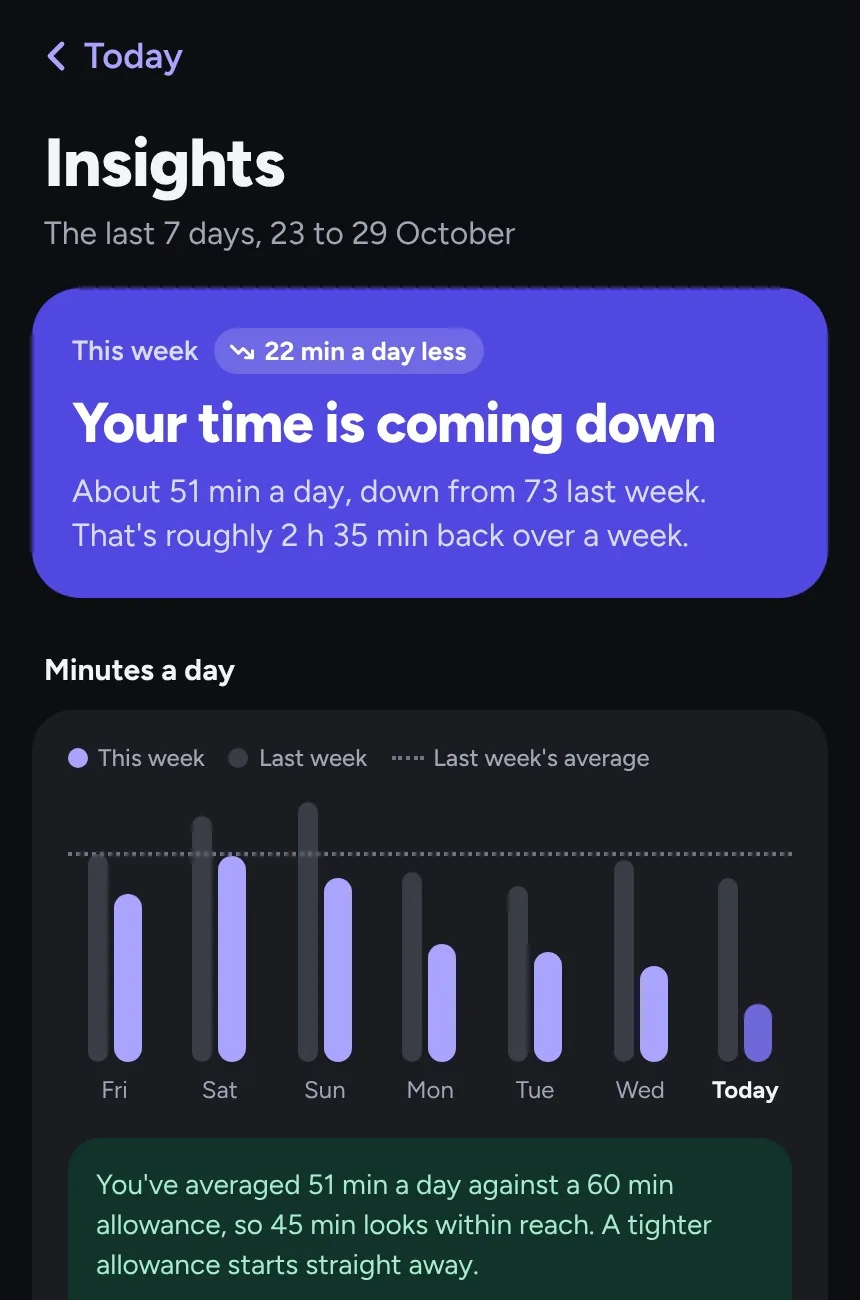
Insights
See where your time goes.
No guilt, no lectures. Just an honest look at your week: each day beside the same day last week, the hours you scroll most and which apps took your time. Where the numbers point to something, Kur8 suggests one thing to try.
It's worked out on your phone from totals only, and never leaves it.
Your data
What you do stays on your phone.
Your social logins stay yours
You sign in to each app on its own page. Kur8 never sees or stores those passwords.
Totals, never who
Kur8 counts minutes and posts. It never records which accounts or posts you saw.
Kept on your phone
Only your Kur8 account is stored online. Everything else stays on your iPhone.
Pricing
Try it free for 14 days.
Kur8 is coming soon to the App Store for iPhone. One subscription covers you and one child, each on your own iPhone.
Monthly
£4.99 a month
After a 14-day free trial.
Best value
Yearly
£29.99 a year
£2.50 a month, after a 14-day free trial.
Paid through your Apple Account. Cancel any time in your iPhone's settings.
Frequently asked questions
Short answers to the questions people ask most.
Getting started
What is Kur8?
Kur8 (said "curate") is an iPhone app that helps adults and teenagers spend less time on social media. It sets one daily time limit across Instagram, Facebook, TikTok, YouTube, X and Snapchat, hides suggested posts, reels and other content you don't want, and locks your feeds at bedtime or while you focus. Parents can set it up on their teenager's phone.
When can I get Kur8?
Kur8 is coming to the App Store for iPhone soon, and Android is planned after that. Join the waitlist to hear first.
Which apps does it work with?
Instagram, Facebook, TikTok, YouTube, X and Snapchat. You open them inside Kur8, signed in to your own accounts, with your filters and limits. On a child's phone, Kur8 can limit YouTube Kids too.
How do the free trial and subscription work?
The first 14 days are free. Then it's £4.99 a month or £29.99 a year, paid through Apple. One subscription covers one adult and one child, on a phone each. Cancel any time in your iPhone's subscription settings.
How is Kur8 different from iPhone Screen Time?
Screen Time limits whole apps, and its limits are easy to skip with a tap. Kur8 works inside your feeds: it hides suggested posts, short videos and paid partnerships, counts the posts you see, and shares one daily allowance across every social app. A looser limit waits until tomorrow, and Sleep Mode and Focus Mode lock every feed. Kur8 can also hide the social apps from your Home Screen, so you only open them in Kur8.
Is Kur8 made by Instagram, TikTok or the others?
No. Kur8 is independent and isn't affiliated with or endorsed by Meta, TikTok, Google, X or Snap.
Time and limits
How can I stop doomscrolling?
Endless feeds and suggested posts are designed to keep you scrolling, so willpower alone rarely works. With Kur8 you set a daily allowance before you start, switch off suggested posts and reels so your feed ends with the people you follow, and let Sleep Mode lock your apps at bedtime. When the time is used up, your feeds close until midnight.
How does the daily allowance work?
It's one total for all your apps, from 15 minutes to 4 hours a day. Time on any of them comes out of it, and when it runs out every feed pauses until midnight. You can also give each app its own limit in minutes, and most in posts as well.
Why does a new limit start tomorrow?
A tighter limit starts straight away. A looser one, such as more minutes, waits until the next day. That way a weak moment late at night doesn't undo the limits you chose with a clear head.
What is Sleep Mode?
Choose a bedtime and a wake-up time. In between, every feed is locked, messages too, however much of your allowance is left, so late-night scrolling doesn't eat into your sleep.
What is Focus Mode?
It's for when you want to get something done without checking your feeds. Lock every app for 15 minutes to 4 hours, starting now, or set a schedule for the days and times you need it. Once it's on, it runs until the time you chose.
What is Insights?
A look back at your last 7 days: how your daily time compares with the week before, when in the day you scroll and which apps took your time, with a suggestion when the numbers point to one. It's worked out on your phone from totals only.
Your feeds
What can Kur8 hide?
Posts with words, phrases or #hashtags you choose, suggested posts, short videos, paid partnerships, creator ads, AI content the platform has labelled, and anyone's posts with a press and hold. You choose which, for every app at once or one at a time.
Can I turn off suggested posts on Instagram?
Instagram itself only lets you snooze suggested posts for 30 days. In Kur8, switch on Only people you follow and suggested posts stay out of your Instagram feed every day, and Hide short videos takes out reels and Explore. The same switches work across your other apps: on TikTok you see Following instead of For You, and on YouTube it opens your subscriptions and hides Shorts.
Does Kur8 hide ads?
No. The platforms' own ads always stay in your feed, because they pay for the apps you use. Some platforms sell a plan with no ads, and Kur8 can point you to it.
Will the filters catch everything?
No, and we won't pretend otherwise. Filters go by the labels the platforms put on posts, such as "Suggested for you" or "Paid partnership", so posts that aren't labelled can slip through.
Where do hidden posts go?
Nowhere. Kur8 only covers them up on your screen, and nothing is deleted. Tap the note where a post was hidden to see it, then hide it again.
Can I hide direct messages?
Yes. Turn on Hide direct messages, and Kur8 hides the inbox on Instagram, Facebook, TikTok and X. It's off to start with.
Privacy
Can Kur8 see my messages or passwords?
No. You sign in on each platform's own page, and Kur8 never sees or stores those passwords. Kur8 never reads your chats.
What does Kur8 keep about me?
Only your Kur8 account is stored online. Your limits, filters and time stay on your phone. Kur8 counts minutes and posts, and never records which accounts or posts you saw.
Families
Is Kur8 a parental control app?
Kur8 has a parent version, but it isn't spyware. It limits and filters your teenager's social apps on their own iPhone, with changes behind your PIN. It never shows you their messages, posts or the accounts they follow, only totals such as time spent, and your child can always see that Kur8 is there.
Can I set up Kur8 for my child?
Yes, for ages 13 to 17. Install Kur8 on your child's phone and choose For my child. You set a PIN, and their limits, filters, Sleep Mode and Focus Mode then need it to change.
What can I see of my child's use?
Totals only, such as time spent in each app. Never which accounts or posts they saw, and your child is told about it on their own screen.
Can my child ask for more time?
Yes. When a limit runs out they can ask, and you approve it with your PIN on their phone.

Imagine putting your phone down and actually feeling rested.
Get your time back, starting today.
Kur8. For you, or for your teenager.
Coming soon to iPhone · 14-day free trial